Moto Mods™ SDK for Android™: Overview
Android applications can discover, communicate and interact with Moto Mods using APIs provided by the Moto Mods SDK for Android. Use the Moto Mods SDK for Android when you want to create a Moto Mod aware application that can observe Moto Mod hotplug events or perform base level I/O with a Moto Mod that is tightly coupled with a specific Moto Mod design.
A Moto Mod aware application typically has to:
- Discover connected Moto Mod devices, using a listener or broadcast intents
- Determine which MotoMod is attached
- Retrieve information on the protocols supported by the attached Moto Mod
- Listen, and react to state changes on an attached Moto Mod
If the Moto Mod supports a custom communication protocol, the application will need to:
- Ask the user for permission to connect to the Moto Mod device
- Communicate with the Moto Mod device by reading and writing data on the appropriate interface endpoints
- Close communication when done
Android Class Structure
The Moto Mods SDK allows Android applications to detect when a specific Moto Mod device is attached, to communicate directly with the device over a direct messaging channel or configure the device according to settings stored in persistent memory on the Moto Z. A Moto Mod aware application should include the Moto Mods SDK library in its Android Studio project to compile code that accesses the SDK APIs.
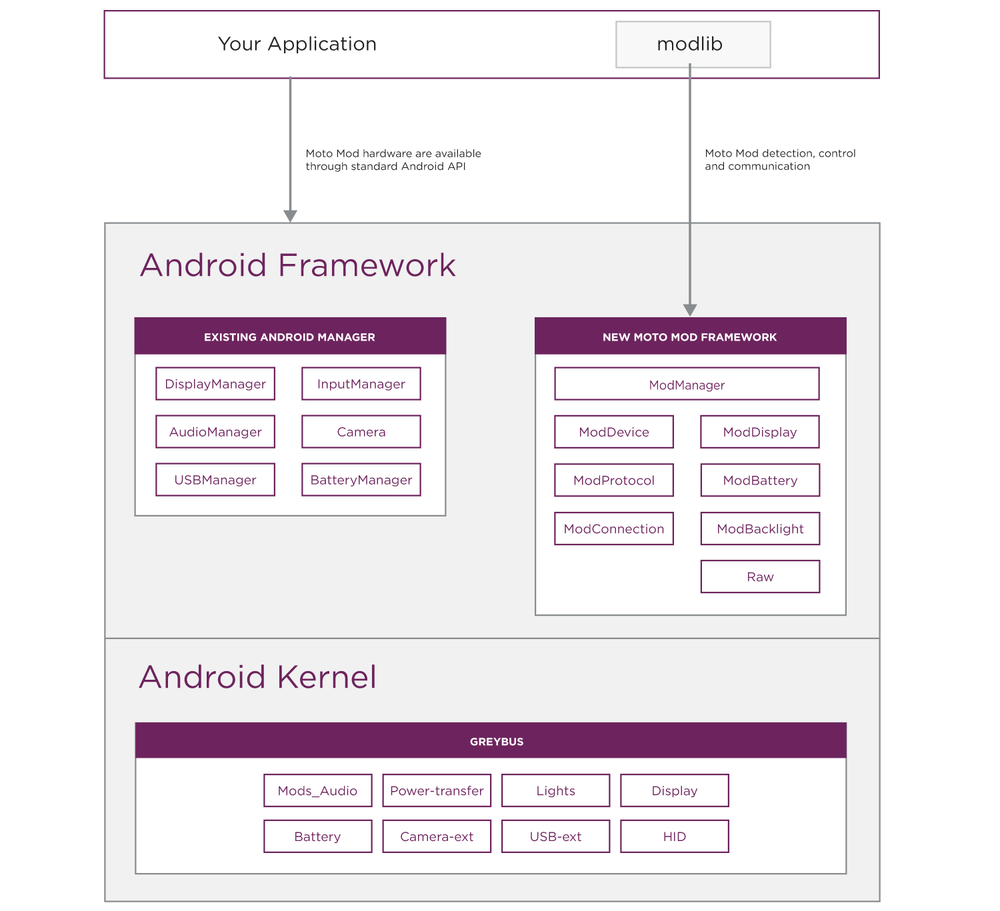
Detection and Configuration
The central components of the Moto Mods SDK are the ModManager and ModDevice classes.
Using the ModManager, an Android application can register to receive the ATTACH and DETACH broadcast intents sent on every Moto Mod state change. An application can also retrieve the list of current attached Moto Mods with the getModList() function and identify which Moto Mod is attached through its Vendor (“VID”) and Product (“PID”) ID.
An Android application needs to bind to the ModManager to retrieve the attached ModDevice. From the ModDevice, you can enumerate the ModProtocol supported by this ModDevice to determine its capabilities, and obtain an object or interface to communicate with each component exposed by the Moto Mod.
All certified Moto Mods have a unique combination of Vendor ID (VID) and Product ID (PID). If the behavior of your application relies on a specific Moto Mod being attached to the device, your application should use the VID and PID fields to confirm that the Moto Mod attached to your device is the one which your application expects.
The following table describes the Moto Mods SDK classes and APIs in the com.motorola.mod package.
To know when a Moto Mod is attached or query the parameters of a Moto Mod, an application needs to use the following classes are provided by the Moto Mods SDK for Android.
| Class | Description |
ModManager |
The ModManager class is the central component of the Moto Mods SDK for Android. It broadcasts ATTACH, DETACH intents and provides API for applications to track state changes of a Moto Mod, enumerate the list of Moto Mod currently attached to the phone. |
ModDevice |
The An application can retrieve the |
ModProtocol |
The ModProtocol class describes the protocol supported by a ModDevice. Use this class to query whether the currently attached Moto Mod declares supports a particular protocol. |
ModConnection |
The ModConnection class enables an application to access a Raw device file descriptor. |
Device Control and Communication
In many cases, developer can use existing Android (AOSP) API. For devices below, there are no new Motorola namespace API to work with and use these standard devices.
| Device Type | Description |
Displays |
Display devices are natively supported over the Moto Mod interface and the Android DisplayManager and MediaRouter. Moto has also exposed the ability to customize secondary displays system behavior through the ModDisplay java class. |
Audio |
Audio devices are natively supported over the Moto Mod interface and the Android AudioManager, without any additional SDK/API. |
HID |
Use the Android standard HID support to work with an HID capable. There are no additional HID API exposed in the Moto Mods SDK. |
USB |
Use the Android standard USB Manager API to work with an USB capable Moto Mod. There are no additional USB API exposed in the Moto Mods SDK. |
Battery |
Your phone will automatically make best use of battery devices when attached |
In addition to the generic Moto Mod detection classes, the Moto Mods SDK provides some additional API to control and manage certain types classes.
| Device Type | Description |
Custom Devices |
Custom devices are supported using the The |
Battery Status |
The |
Backlit Display |
The ModDisplay class provides API to enable you to turn attached display on and off. The ModBacklight class provides APIs to set brightness of Moto Mod display. |
Android Development Model
Some Moto Mods capabilities integrate seamlessly with Android and won’t require a dedicated Android application. Examples of these include Moto Mods with battery, display, speaker or input hardware. For these, the hardware exposed by a Moto Mod will be immediately available for use when the Moto Mod is attached to a phone.
Most Moto Mod developers will want to create a custom Android application to interact and control their hardware. The extent to which an application uses the Moto Mods SDK depends on its use cases.
| Use Case | SDK Required? | Development Model |
| You need to know when a specific Moto Mod is attached or detached. | Yes | Use our ModManager and ModDevice classes to listen for Moto Mod attach and detach intents and recognize which Moto Mod is attached. |
| You need to send/receive data to your Moto Mod | Yes | Use our ModManager, ModDevice, ModConnection and ModProtocol classes to get access to the Raw device and communicate with the Moto Mod. |
| You need to display content on the secondary display in your Moto Mod | No | Moto Mod displays are Android secondary displays, and always accessible through Android’s DisplayManager and MediaRouter. |
| You need to play content through the speaker of an attached Moto Mod. | No | Audio is automatically routed to/from an Audio Moto Mod based on its declared audio device type. Your application can simply Android’s AudioManager to control content playback. |
| You want to power your Moto Z with battery in your Moto Mod | No | Your Moto Mod battery is utilized by a Moto Z based on the battery type defined in the Moto Mod battery-firmware implementation. The Moto Z charging state is reported through Android’s Battery Manager ACTION_BATTERY_CHANGED intent. |